What Docker Solved, Where It Came From, and Why Podman Exists
· Sourabh G Kulkarni
Docker standardized containers into a developer superpower, but monolithic root daemons have limits. Here is how isolation evolved, where Docker falls short, and why tools like Podman, Buildah, and containerd thrive.
Before containers became the industry standard, moving code from a developer's workstation to a staging cluster or production server was a constant gamble. The infamous excuse—"it works on my machine"—was not a joke; it was an expensive engineering reality. Differences in glibc versions, system environment variables, local path layouts, background daemon versions, and conflicting dependencies caused unpredictable deployment failures.
Virtual machines solved consistency by packing the application along with a full guest operating system. But VMs were heavy. Booting an OS kernel took minutes, idle memory footprints hovered in gigabytes, and VM disk images bloated storage. Teams needed the isolation guarantees of a VM, but with the speed, density, and lightness of a standard host process.
That tension gave birth to modern containerization.
Where Docker Came From: Standing on the Shoulders of Giants
A common misconception is that Docker invented Linux process isolation. It did not. Linux process confinement and isolation technologies had been maturing for decades:
- 1979 (
chroot): Introduced in Unix V7 to change the apparent root directory for a process. - 2000 (FreeBSD Jails): Added network and filesystem virtualization to
chroot. - 2004 (Solaris Zones): Provided full user and OS virtualization with fine-grained resource control.
- 2006–2008 (cgroups & namespaces): Google engineers contributed control groups (
cgroups) to the Linux kernel to throttle CPU and memory usage. Paired with Linux namespaces (PID, NET, MNT, IPC, UTS, USER), the kernel could make a process believe it was running in a dedicated machine without booting a second OS kernel. - 2008 (LXC - LinuX Containers): Unified cgroups and namespaces into the first mainstream Linux container manager.
┌─────────────────────────────────────────────────────────────┐
│                     Application Process                     │
├─────────────────────────────────────────────────────────────┤
│   cgroups (resource limits)  +  Namespaces (process bounds) │
├─────────────────────────────────────────────────────────────┤
│                     Shared Host Kernel                      │
└─────────────────────────────────────────────────────────────┘
The 2013 Breakthrough: Solomon Hykes and the Docker Workflow
If isolation already existed in LXC, why did Docker take over the world?
In March 2013, at PyCon, Solomon Hykes presented Docker, originally built as the internal container engine for dotCloud (a Platform-as-a-Service company).
Docker's genius was not kernel technology—it was developer experience (DX) and distribution:
- The
Dockerfile: A clean, human-readable, reproducible recipe to build an execution environment step-by-step. - Layered Copy-on-Write Filesystems (AUFS / OverlayFS): Caching intermediate build steps so rebuilds and pulls took seconds instead of minutes.
- The Central Image Registry (Docker Hub): A unified repository system where any developer could pull a base image (
docker pull redis) or publish an application artifact (docker push). - Simple CLI (
docker build,docker run): It collapsed hundreds of complex kernel flag permutations into a single intuitive interface.
Docker transformed containerization from an esoteric kernel feature into an everyday developer superpower.
Where Docker Falls Short: The Operational Cracks
As containers moved from local laptops into mission-critical production clusters and hardened CI/CD runners, Docker’s architectural trade-offs began creating significant friction.
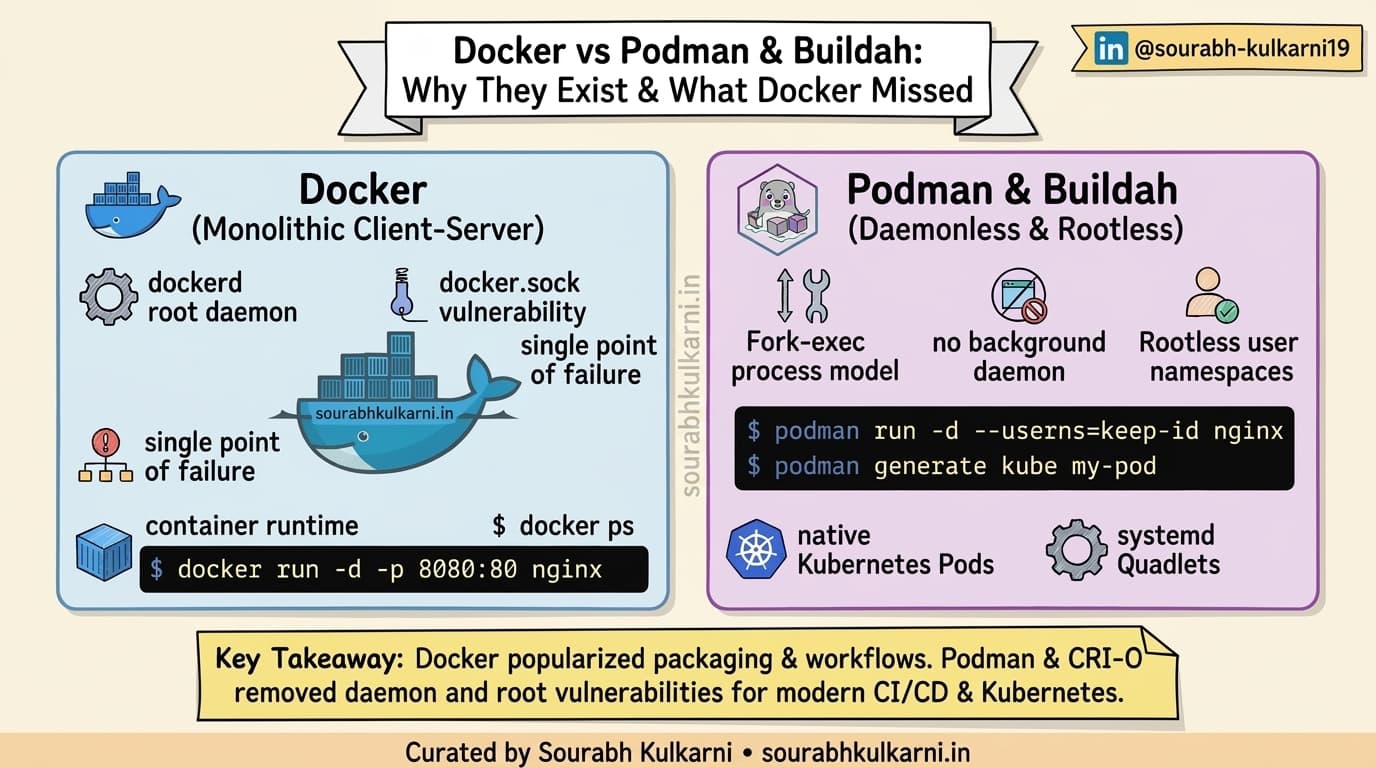
1. The Monolithic dockerd Daemon (Single Point of Failure)
Docker operates on a client-server model: the docker CLI sends commands over a Unix socket (/var/run/docker.sock) to a persistent background service: the dockerd daemon.
[Docker CLI] ──(REST / socket)──> [dockerd daemon] ──> [containerd] ──> [runc] ──> [Container]
- If the Docker daemon crashes, is upgraded, or hangs under heavy load, your container processes are impacted unless live-restore is meticulously configured.
- The daemon does everything: network configuration, image storage, image building, volumes, and process lifecycle. It violates the classic Unix philosophy of "do one thing and do it well."
2. The Root Security Dilemma (root by Default)
To interact with kernel network bridges, cgroups, and storage drivers, dockerd historically required running as root.
- Giving a developer access to the
/var/run/docker.socksocket is functionally equivalent to giving them passwordlesssudoroot access to the entire host. Mounting/or manipulating host files via container volumes bypasses host restrictions. - In multi-tenant environments, high-compliance enterprise sectors (finance, healthcare), or shared CI/CD runners, having root-owned container daemons creates an unacceptable attack surface.
3. Docker-in-Docker (DinD) Headaches in CI/CD
Building container images inside a containerized CI runner (like GitLab CI, GitHub Actions, or Kubernetes jobs) using Docker typically required running in --privileged mode or binding the host Docker socket. Privileged containers break host containment barriers and expose nodes to cluster-wide security escapes.
4. Kubernetes Deprecated Dockershim (v1.24)
Kubernetes originally interfaced with Docker through an adapter layer known as dockershim. However, Kubernetes only needed a lightweight runtime to launch and run containers—not Docker's full build engine, registry client, and desktop CLI. In Kubernetes 1.24, dockershim was officially removed in favor of direct CRI (Container Runtime Interface) runtimes like containerd and CRI-O.
Enter the Alternatives: Why Podman, Buildah, and Skopeo Exist
To solve the security and architectural constraints of Docker, Red Hat and the open-source community introduced a suite of modular, daemonless tools designed around Open Container Initiative (OCI) standards.
┌─────────────────────────────────────────────────────────────┐
│                    Modular Tooling Suite                    │
├───────────────┬────────────────────────────┬────────────────┤
│    Podman     │          Buildah           │     Skopeo     │
│ (Run & Manage)│       (Build Images)       │ (Inspect/Sync) │
└───────┬───────┴─────────────┬──────────────┴────────┬───────┘
        │                     │                       │
        └─────────────────────┼───────────────────────┘
                              ▼
                [ OCI Image & Runtime Spec ]
                              │
                    [ runc / crun ]
                              │
                    [ Linux Kernel ]
1. Podman: Daemonless and Rootless by Design
Podman (Pod Manager) is a drop-in replacement for the Docker CLI (alias docker=podman works for the vast majority of day-to-day commands), but its underlying architecture is fundamentally different:
- Daemonless (Fork-Exec Model): Podman does not rely on a background daemon. When you run
podman run, it forks and executes container processes directly using the standard Linux process model. System monitoring tools (ps,top,systemd) treat the container as a regular child process. - Rootless from Day One: Podman utilizes Linux user namespaces (
subuidandsubgid) allowing ordinary, unprivileged users to build, pull, and run containers without root privileges or sudo rights. If a process breaks out of a rootless container, it only gains the rights of the unprivileged host user—not root. - Native Pod Support: Unlike Docker, Podman natively understands the concept of Pods (shared network and IPC namespaces between related containers), mimicking the exact atomic execution unit of Kubernetes. You can even generate Kubernetes YAML directly using:
podman generate kube my-app > pod.yaml - Systemd Integration: Since Podman has no daemon managing state, it integrates cleanly with
systemdusingpodman-generate-systemdor Quadlet files to manage containers with native OS restart policies and dependencies.
2. Buildah: Dedicated Image Crafting Without Daemons
Buildah specializes in creating OCI container images without requiring a container runtime or daemon.
- It can parse standard
Dockerfiles. - Crucially, it allows you to build images directly from shell scripts using host commands without installing tools into the target image:
container=$(buildah from alpine) buildah run $container apk add --no-cache curl buildah commit $container my-custom-image - Buildah runs completely unprivileged in CI pipelines, making secure container image builds inside Kubernetes pods trivial without needing
--privilegedflags.
3. Skopeo: Inspect and Copy Without Pulling
Before Skopeo, inspecting a remote image or copying an image between two remote container registries required pulling the entire image layers to your local Docker daemon and re-pushing them.
- Skopeo inspects image manifests, signatures, and metadata directly on the registry without downloading gigabytes of layers:
skopeo inspect docker://docker.io/library/ubuntu:latest
skopeo copy docker://source-registry.io/app:v1 docker://prod-registry.io/app:v1
When to Use What: A Practical Comparison
| Requirement / Scenario | Docker | Podman / Buildah / Skopeo | containerd / CRI-O |
|---|---|---|---|
| Local Developer Setup (Mac/Windows) | ⭐ Excellent (Docker Desktop with Compose) | Strong (Podman Desktop) | Not designed for direct user CLI |
| CI/CD Build Pipelines | Requires DinD / privileged socket access | ⭐ Ideal (Rootless, daemonless, no root required) | Specialized for runtime, not builds |
| Enterprise / Multi-Tenant Security | Needs rootless dockerd setup & extra hardening | ⭐ Native rootless isolation out of the box | Runs with container boundaries managed by Kubelet |
| Kubernetes Worker Nodes | Deprecated via dockershim | Not intended as node CRI runtime | ⭐ Industry standard CRI runtime |
| Compose Workflows | Native docker compose | Supported via podman-compose | Not applicable |
| systemd OS Services | Managed by daemon | ⭐ Direct integration via Quadlets / systemd | Managed by kubelet |
The Takeaway
Docker is responsible for the container revolution. It defined the ergonomics, popularized the image format, and created the developer habits we still rely on today.
However, modern DevOps is no longer bound to a single monolithic tool:
- For local developer iteration and familiar Compose workflows, Docker Desktop remains popular and productive.
- For hardened CI/CD runners, rootless security, and production Linux hosts, Podman and Buildah provide a safer, daemonless architecture that respects Linux user privileges.
- For orchestration at scale, containerd and CRI-O handle the heavy lifting quietly under Kubernetes.
Docker didn't just solve dependency packaging—it paved the way for an entire ecosystem of modular, standard-compliant tools.