What Is GitLab? Origins, Self-Hosting, Enterprise Edition, and Why Companies Choose It
· Sourabh G Kulkarni
From a local Ruby script to a DevSecOps platform: how GitLab works, why regulated enterprises insist on self-hosting, and why companies choose it over Jenkins.
Most developers meet GitLab as "that orange-fox alternative to GitHub." But in enterprise IT, defense contracts, banking clusters, and high-compliance infrastructure, GitLab is often the default operating system for software delivery.
While GitHub began as a developer social network centered around Git hosting, GitLab was engineered from the ground up as a single application for the entire DevSecOps lifecycle—spanning planning, repository hosting, CI/CD, container registry, security scanning, compliance governance, and deployment orchestration.
Understanding why organizations choose GitLab requires understanding its origins, its modular on-premises architecture, the distinction between Community and Enterprise editions, and why large enterprises frequently prefer it over stitched-together suites of GitHub, Jenkins, Jira, and SonarQube.
1. Where GitLab Came From: The 2011 Open-Source Breakthrough
In 2011, Ukrainian software engineer Dmitriy Zaporozhets worked at a consulting firm where developers needed a central Git server. GitHub was already popular, but it was purely a hosted SaaS platform, and its enterprise self-hosted tier was prohibitively expensive for most teams.
Zaporozhets wanted a self-hosted Git server that his team could run on their own hardware. Alongside Valery Sizov, he wrote the first version of GitLab in Ruby on Rails, releasing it as open source under the MIT license.
In 2012, Dutch entrepreneur Sid Sijbrandij saw the open-source project, realized the enormous demand for on-premises source code management, and teamed up with Zaporozhets to form GitLab Inc.
┌────────────────────────────────────────────────────────────────────────┐
│                        The Evolution of GitLab                         │
├─────────────────┬──────────────────────────────────────────────────────┤
│ 2011            │ Dmitriy Zaporozhets creates GitLab as an open-source │
│                 │ Ruby on Rails alternative to GitHub.                 │
│ 2012–2014       │ Sid Sijbrandij co-founds company; launches GitLab CI │
│                 │ with standalone Go-based runners.                    │
│ 2015–2018       │ Combines Git + CI/CD into a single codebase.         │
│                 │ Adds Container Registry, Kubernetes integration, SAST│
│ 2018–Present    │ Completes "Single Application" DevSecOps vision;     │
│                 │ IPO on NASDAQ (GTLB); global remote-first benchmark. │
└─────────────────┴──────────────────────────────────────────────────────┘
GitLab's defining engineering pivot came in 2015. While other vendors treated CI/CD as a third-party plugin ecosystem (GitHub integrated Travis CI or Jenkins; Bitbucket integrated Bamboo), GitLab merged its standalone CI engine directly into the core Rails application.
Pushing a branch immediately triggered a pipeline defined in the same repo via .gitlab-ci.yml. That single architectural decision transformed GitLab from a simple Git web viewer into an end-to-end delivery engine.
2. Under the Hood: The GitLab Architecture
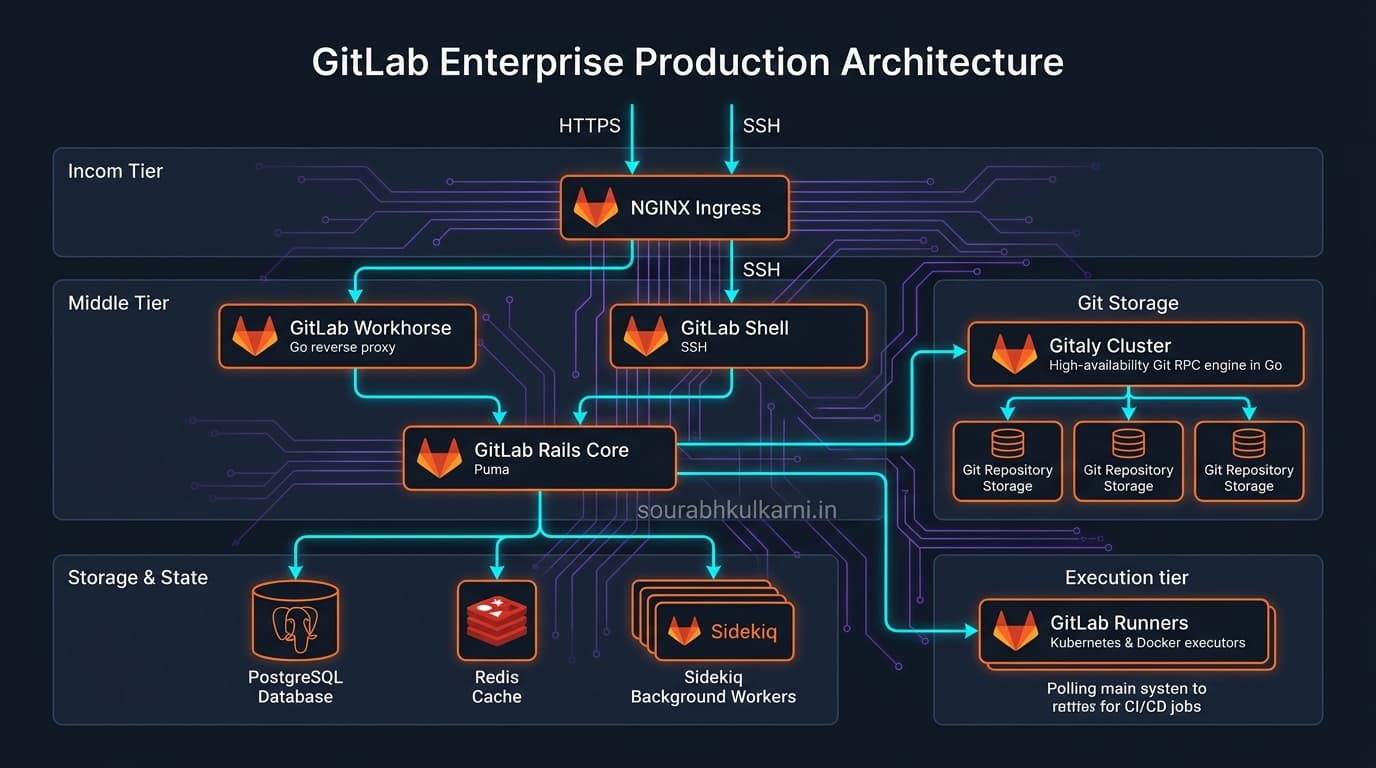
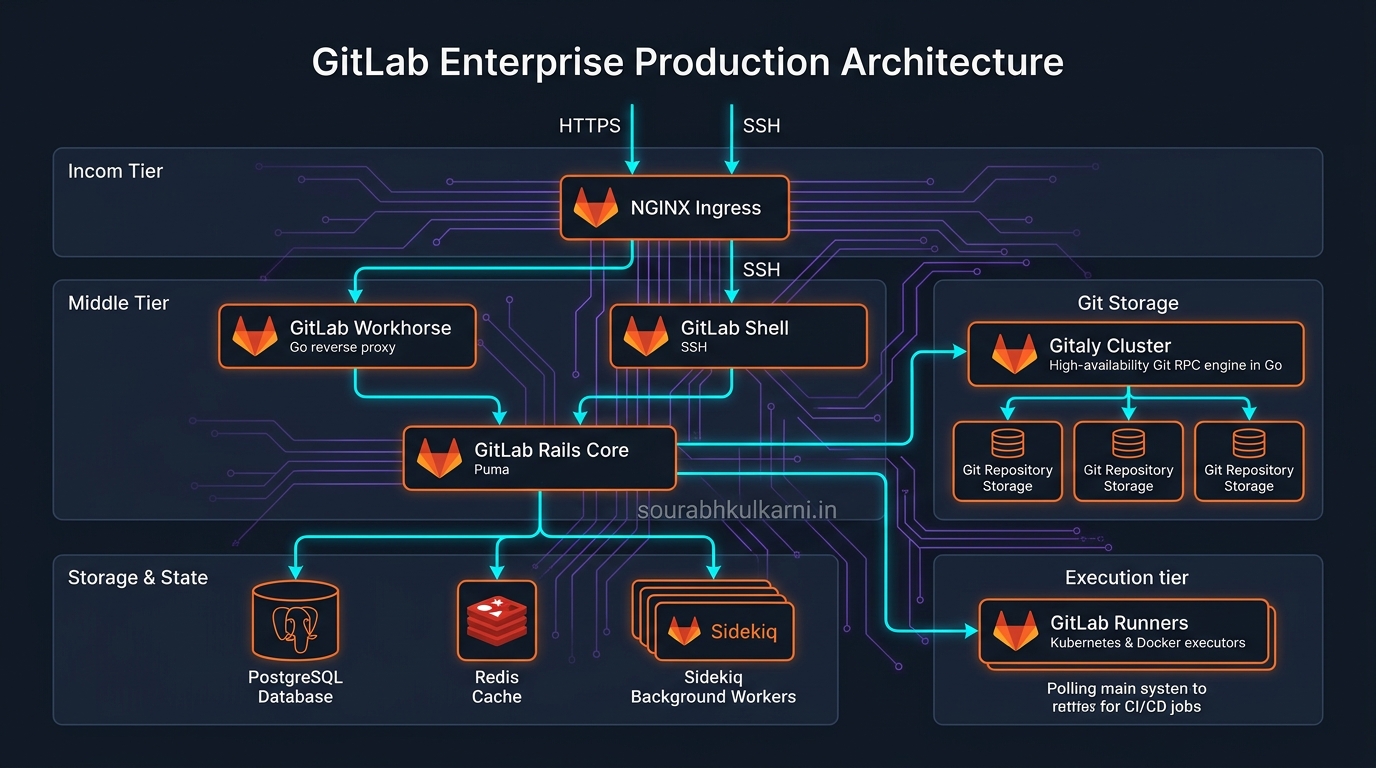
A modern GitLab instance is not a monolithic binary. It is a distributed suite of specialized services engineered to scale from a single VM to high-availability multi-node Kubernetes clusters:
                                [ Incoming Traffic ]
                                         │
                                         ▼
                                   [ NGINX Ingress ]
                                         │
                     ┌───────────────────┴───────────────────┐
                     ▼                                       ▼
             [ GitLab Workhorse ]                    [ GitLab Shell ]
             (Reverse Proxy in Go)                   (SSH Authentication)
                     │                                       │
                     ▼                                       ▼
             [ GitLab Rails ]                        [ Gitaly Cluster ]
             (Unicorn/Puma Core)                     (Git RPC Engine in Go)
                     │                                       │
        ┌────────────┼────────────┐                          ▼
        ▼            ▼            ▼                   [ Git Storage ]
   [PostgreSQL]   [Redis]     [Sidekiq]             (NVMe / Ceph / EFS)
   (Metadata)     (Caching)   (Background Jobs)
 GitLab Enterprise Production Architecture
The Core Components:
- GitLab Workhorse (Go): A lightweight reverse proxy that sits in front of the Rails web server. It handles slow requests, large Git HTTP operations (
git push/git pull), file uploads, and raw artifact streaming without tying up expensive Ruby web worker threads. - GitLab Rails (Puma): The central business logic application handling user auth, project permissions, web UI rendering, API endpoints, and database interactions.
- Gitaly & Gitaly Cluster (Go): Historically, GitLab accessed Git repositories via local disk filesystem calls (NFS). At scale, NFS introduced severe locking contention and latency. GitLab engineered Gitaly, a dedicated gRPC service that executes Git operations directly alongside disk storage, offering automatic three-way data replication and automatic failover.
- GitLab Runner (Go): A standalone, highly scalable execution agent that polls the GitLab coordinator for CI/CD jobs. Runners can run anywhere: bare-metal servers, Docker daemons, AWS EC2 auto-scaling groups, or autoscaling Kubernetes clusters via the Kubernetes executor.
- Sidekiq (Ruby): Asynchronous background job processor backed by Redis, responsible for scheduling pipelines, firing webhooks, sending notifications, and running repository housekeeping.
3. Why Self-Hosting Is Non-Negotiable for Enterprises
Why do banks, healthcare giants, defense contractors, and telecom operators run their own GitLab instances instead of using hosted cloud SaaS (gitlab.com or github.com)?
1. Data Sovereignty and Air-Gapped Networks
Government agencies, defense suppliers, and financial institutions frequently operate in air-gapped environments—networks physically isolated from the public internet. A SaaS platform is legally and technically disqualified. GitLab Omnibus and Cloud Native GitLab Helm charts can be completely mirrored and installed inside disconnected networks with zero external internet dependencies.
2. Regulatory Compliance (SOC2, HIPAA, PCI-DSS, FedRAMP)
When source code contains proprietary algorithms, cryptographic keys, or sensitive business logic, legal departments require absolute ownership of where that code resides, how it is encrypted at rest, and who has physical server access. Self-hosting guarantees that code never leaves the organization's virtual private cloud (VPC) or data center.
3. Proximity to Internal Infrastructure & Runners
Running CI/CD pipelines in the cloud against on-premises databases or internal staging hardware requires opening VPN tunnels, NAT gateways, and exposing ingress firewalls. With self-hosted GitLab, runners live right next to the target compute clusters on a 10Gbps local network. Builds pull base images and push 5GB Docker artifacts in milliseconds without incurring astronomical cloud bandwidth egress charges.
4. Zero External Dependency Downtime
If a third-party SaaS platform suffers a regional outage or DNS partition, hundreds of engineers sit idle unable to push code or run deployments. Self-hosting puts disaster recovery, high-availability replication, and SLA uptime entirely within the internal operations team's control.
4. Community Edition (CE) vs. Enterprise Edition (EE)
GitLab operates on an open-core model. The codebase is organized into Community Edition (CE) and Enterprise Edition (EE):
┌────────────────────────────────────────────────────────────────────────┐
│                        GitLab Edition Breakdown                        │
├─────────────────────────┬──────────────────────────────────────────────┤
│ Community Edition (CE)  │ 100% Free & Open Source (MIT License)        │
│                         │ Core Git hosting, basic CI/CD, issues, MRs,  │
│                         │ Container Registry, Package Registry.       │
├─────────────────────────┼──────────────────────────────────────────────┤
│ Enterprise Edition (EE) │ Commercial Core (Proprietary additions)      │
│ - Free Tier             │ CE features packaged with EE codebase.       │
│ - Premium Tier          │ Code review analytics, enterprise agile,    │
│                         │ protected environments, Geo-replication, 24/7│
│ - Ultimate Tier         │ Full DevSecOps: SAST, DAST, Secret Scanning, │
│                         │ Container Scanning, License Compliance,      │
│                         │ Vulnerability Management, Audit Events.      │
└─────────────────────────┴──────────────────────────────────────────────┘
The Killer Capabilities of GitLab EE:
- GitLab Geo (Disaster Recovery & Global Acceleration): Allows an enterprise with offices in New York, London, and Tokyo to run read-only replica nodes worldwide. Developers in Tokyo pull and clone multi-gigabyte repos locally in seconds over LAN speeds, while pushes automatically proxy back to the primary node.
- Built-In Shift-Left Security (Ultimate Tier): Every pull request automatically runs SAST (Static Application Security Testing), DAST (Dynamic Analysis), Secret Detection, and Container Dependency Scanning. Security vulnerabilities are caught in the MR diff before the code ever merges into main.
- Compliance Frameworks & Enforced Pipelines: Central security teams can mandate that every project in a compliance group automatically runs SonarQube, Prisma Cloud scans, or Terraform compliance policies without giving individual project owners permission to disable or bypass them.
5. Why Enterprises Choose GitLab Over the Alternatives
Organizations rarely compare GitLab to just one tool. They compare GitLab to an entire constellation of stitched-together point solutions:
┌──────────────────────────────────────┬─────────────────────────────────┐
│     The Traditional DevOps Stack     │       The GitLab Approach       │
├──────────────────────────────────────┼─────────────────────────────────┤
│ Source Code:      GitHub / Bitbucket │                                 │
│ CI/CD Engine:     Jenkins / TeamCity │                                 │
│ Security Scans:   SonarQube / Snyk   │      GitLab Single Platform     │
│ Artifacts:        Nexus / Artifactory│                                 │
│ Issue Tracking:   Jira Software      │   (One UI, One Permission Model,│
│ Deployments:      Spinnaker / ArgoCD │    One Audit Log, One API)      │
└──────────────────────────────────────┴─────────────────────────────────┘
1. The Death of the "Integration Tax"
Stitching together GitHub, Jenkins, Jira, SonarQube, and Artifactory requires maintaining dozens of API tokens, OAuth integrations, webhook listeners, and plugin upgrades. When Jenkins upgrades its Java runtime or a GitHub webhook fails silently, deployment pipelines collapse.
GitLab eliminates that integration tax. Permissions, branch protection, code review, CI/CD runners, container images, and deployment audit logs all share a single identity and permission model.
2. Docker-Native CI/CD by Default
Jenkins historically relied on mutable build servers where plugins, SDK versions, and global binaries collided. GitLab CI was built around Docker containers from day one:
# .gitlab-ci.yml - isolated, reproducible execution
build-backend:
  image: golang:1.24-alpine
  stage: build
  script:
    - go build -o bin/api ./cmd/api
  artifacts:
    paths:
      - bin/api

deploy-prod:
  image: alpine/k8s:1.30.0
  stage: deploy
  environment:
    name: production
  script:
    - kubectl apply -f k8s/production/
  only:
    - main
Every job runs inside a clean, disposable container environment, eliminating the notorious "works on Jenkins worker 3, fails on worker 5" problem.
3. Unified Governance and Auditability
In a regulated industry, preparing for an ISO 27001 or SOC2 audit requires tracing who wrote a line of code, who reviewed the pull request, which pipeline tested it, which security vulnerabilities were detected, who clicked approve for production, and what commit hash is currently running on the server.
Doing this across Jira, GitHub, Jenkins, and Spinnaker takes weeks of database queries and spreadsheet correlation. In GitLab, that audit trail is an out-of-the-box, immutable view on the deployment dashboard.
Complete Comparison: GitLab vs. The Alternatives
| Capability / Factor | GitLab (Self-Hosted / EE) | GitHub Enterprise | Atlassian Bitbucket + Jenkins |
|---|---|---|---|
| Primary Architecture | Single integrated DevSecOps application. | Hub-and-spoke (Git core + GitHub Actions + Marketplace apps). | Fragmented suite (Bitbucket for Git, external Jenkins for CI). |
| Self-Hosting Maturity | Industry Benchmark. Native Omnibus package, Linux packages, and Helm charts. | GitHub Enterprise Server exists, but core engineering focus is cloud-first. | Bitbucket Data Center exists; Jenkins requires standalone cluster management. |
| Air-Gapped Support | Full first-class support; standalone registries and offline license models. | Available on GHES, but complex offline action mirroring. | Possible, but plugin management in Jenkins without internet is notorious. |
| CI/CD Configuration | Strict, clean .gitlab-ci.yml with native DAG pipelines (needs:). | Flexible .github/workflows/*.yml with rich reusable actions. | Groovy Jenkinsfile (powerful, but error-prone and hard to test). |
| Built-In Security (SAST/DAST) | Native in Ultimate tier; results inline in Merge Request diffs. | Advanced Security (GHAS) add-on license required. | Requires third-party tools (SonarQube, Snyk, Veracode) and custom glue. |
| Permissions Model | Hierarchical Groups and Subgroups matching company org charts. | Organizations and Teams (flat structure; nested groups limited). | Projects and Repositories tied to Jira user directories. |
| Cost Predictability | Per-user tier pricing (all features included in tier). | Per-user pricing + compute minutes billing for runners. | Separate licenses for Bitbucket, Jira, and infrastructure compute for Jenkins. |
The Engineering Bottom Line
GitLab is not simply a repository host. It is an industrial software manufacturing line.
- If your team is an open-source project or a cloud-native startup prioritizing open collaboration and community contributions, GitHub remains the natural cultural home.
- But if you are an enterprise operating under strict data governance, banking regulations, air-gapped environments, or seeking to replace a brittle collection of legacy Jenkins servers with a single governed pipeline, GitLab is engineered specifically for that reality.
By collapsing code hosting, CI/CD, security guardrails, and deployment management into a single declarative platform, GitLab removes the operational friction of delivering software securely at scale.