What Is Kubernetes? Its Origins, Benefits, and How It Works
· Sourabh G Kulkarni
Running one container is easy. Running hundreds reliably across a fleet is where Kubernetes comes in. Here is what it solves, how declarative reconciliation works, and where it came from.
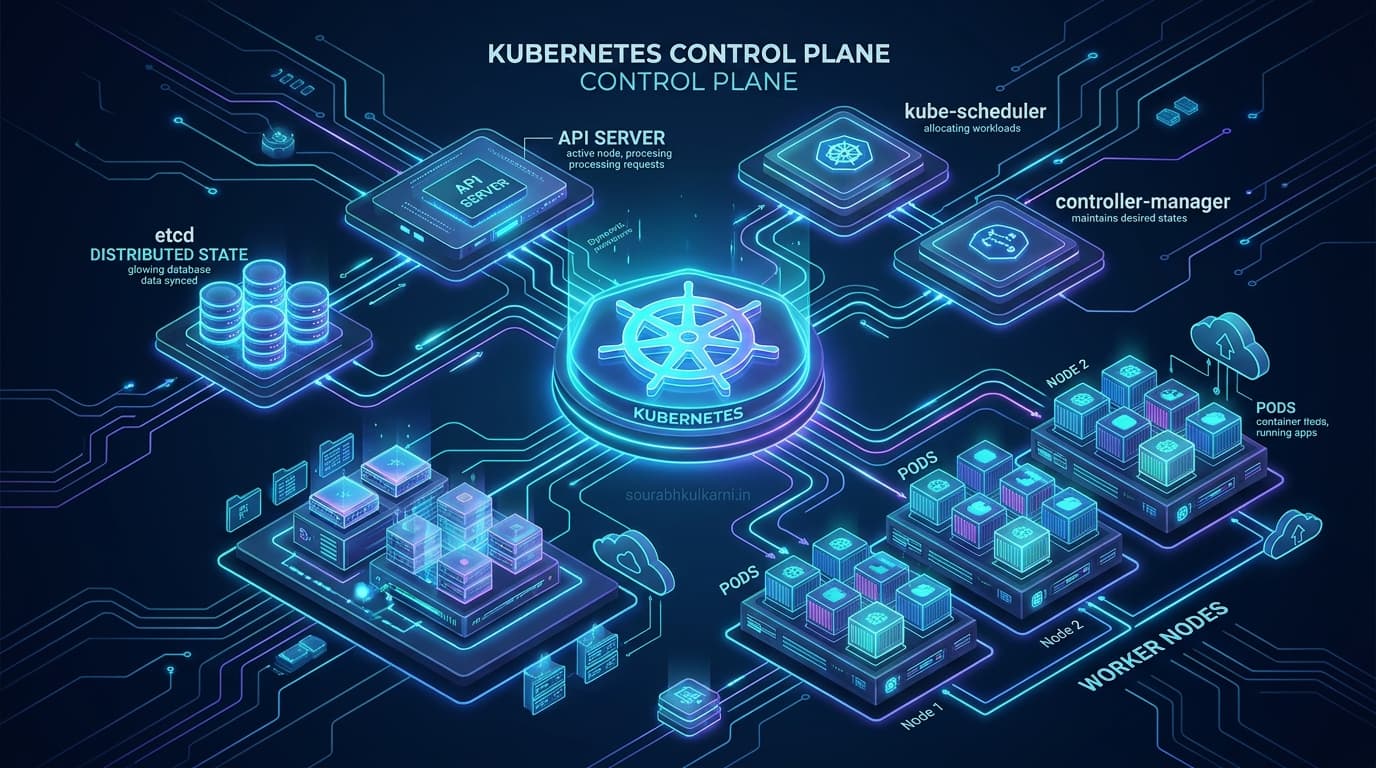
Running a container is easy. Running hundreds of containers reliably across multiple machines is a completely different engineering problem.
A single Docker container can run on one host. But what happens when that host fails? How do you distribute workloads across machines, roll out a new application version with zero downtime, scale replicas during traffic spikes, and keep services reachable as containers are dynamically replaced?
You can solve these problems with custom bash scripts and ad-hoc automation. Eventually, however, that automation becomes another brittle system you must build, monitor, debug, and maintain.
Kubernetes exists to manage that complexity through a declarative API and a set of controllers that continuously reconcile actual state with your desired state.
Understanding this idea explains what Kubernetes solves, why it was created, and when it makes sense to use it.
What Is Kubernetes?
Kubernetes is an open-source container orchestration platform that automates the deployment, scaling, and operational lifecycle of containerized applications.
Instead of manually deciding where every application instance should run, you declare what you want the system to look like. Kubernetes coordinates the scheduling and health checks needed to move the cluster toward that state.
For example, you might declare that an application should have three replicas, use a particular container image, and request a specific amount of CPU and memory:
apiVersion: apps/v1
kind: Deployment
metadata:
  name: payment-processor
spec:
  replicas: 3
  selector:
    matchLabels:
      app: payment-processor
  template:
    metadata:
      labels:
        app: payment-processor
    spec:
      containers:
        - name: app
          image: internal-registry.io/payment:v2.1.0
          resources:
            requests:
              cpu: "250m"
              memory: "512Mi"
          ports:
            - containerPort: 8080
Kubernetes uses resources such as Pods, Deployments, and Services to represent and manage that configuration.
The important distinction is this: you describe the desired outcome; Kubernetes continuously works to achieve it.
What Problem Does Kubernetes Solve?
Containers solve application packaging and runtime isolation. They do not, by themselves, provide a complete system for operating applications across a fleet of physical or virtual machines.
Consider a production application running on several servers. You need to answer questions such as:
- Which machine has enough CPU and memory headroom to run a new workload?
- What happens when a container crashes or an entire physical node goes offline?
- How do you maintain the required number of application replicas without human intervention?
- How do you roll out a new software version without replacing everything at once?
- How do services discover and communicate with changing, ephemeral IP addresses?
- How do you manage secret keys, configurations, and storage volumes consistently?
You can implement individual scripts for these problems. The challenge is making them work together reliably as your environment and team size grow.
Kubernetes provides a common API and a collection of coordinated mechanisms for managing these concerns.
It does not eliminate every operational responsibility. Networking, persistent storage, security policies, telemetry, and application-level resiliency still require careful engineering. What Kubernetes provides is a consistent foundation on which to build those capabilities.
Where Did Kubernetes Come From?
Kubernetes was heavily influenced by Google's experience operating massive-scale internal workloads with a cluster management system called Borg.
Google engineers had spent over a decade learning how to schedule workloads, manage multi-tenant resources, and handle server failures across fleets of hundreds of thousands of machines. Those hard-won operational lessons shaped Kubernetes.
The project was announced publicly in 2014 by Google engineers—including Joe Beda, Brendan Burns, and Craig McLuckie—and Kubernetes 1.0 was released in July 2015. Google donated the project to the newly formed Cloud Native Computing Foundation (CNCF) alongside the 1.0 release.
The important part of this history is not simply that Kubernetes came from Google. It is that Kubernetes brought ideas developed through large-scale hyperscale operations into an open-source platform that organizations could adopt across any cloud or data center.
Kubernetes is not Borg, nor is it a direct copy of Borg. It is an independent open-source system shaped by similar operational challenges and designed around an extensible, declarative API.
How Kubernetes Works: Desired State and Reconciliation
The central architectural idea behind Kubernetes is reconciliation:
┌─────────────────────────────────────────────────────────────┐
│                 The Kubernetes Control Loop                 │
├─────────────────┬─────────────────────────┬─────────────────┤
│  Desired State  │     Observed State      │  Reconciliation │
│ (YAML Manifest) │   (Running Pod/Nodes)   │  (Active Diff)  │
└────────┬────────┴────────────┬────────────┴─────────┬───────┘
         │                     │                      │
         ▼                     ▼                      ▼
   Declared intent:       etcd tracks           Controllers act:
   3 replicas of v2       Node crashes,         Scheduler boots 1
                          only 2 running        new Pod on Node 3
- You declare a desired state (e.g., in git manifests applied via
kubectl). - The cluster has an actual, continuously changing state (monitored by the API server and stored in
etcd). - Controllers observe that state and take action to reduce the difference between the two.
Imagine a Deployment configured to run three replicas of an application:
- If one Pod disappears because a worker node kernel panics, the system notices that fewer replicas are available than requested. The controller-manager immediately schedules a replacement Pod onto a healthy node.
- If you change the container image tag from
v2.0tov2.1, Kubernetes coordinates a rolling update: booting new Pods, waiting for readiness probes to pass, shifting traffic, and terminating old Pods one at a time.
This is not a one-time script that runs and terminates. Controllers continuously observe resources and reconcile differences in a loop.
The Kubernetes Objects That Matter
- Pods: The smallest deployable units in Kubernetes. A Pod contains one or more closely coupled containers sharing the same network namespace (IP address and localhost) and storage volumes.
- Deployments: Manage replicated, stateless application workloads and declare rolling update strategies and replica counts.
- Services: Provide a stable virtual IP address and internal DNS name for accessing a dynamic, constantly changing set of ephemeral Pods.
- Kube-Scheduler: Analyzes resource requests (CPU/RAM), node taints, tolerations, and affinity rules to select suitable worker nodes for unassigned Pods.
- Controller-Manager: Runs core control loops (NodeLifecycle, ReplicaSet, Endpoints) to guarantee declared states remain true.
Why the Reconciliation Model Matters
Consider a deployment managed entirely by custom bash scripts.
A script might spin up three Docker containers over SSH and report exit 0. But what happens if one container runs out of memory ten minutes later? Does another process notice? Does it know the required replica count? What happens if the deployment script fails midway through an update?
With Kubernetes:
- The desired state is stored immutably in API resources.
- Controllers continuously reconcile the system 24/7 without human intervention.
- The operational model shifts from issuing imperative, one-off commands to declaring intent and observing the system's automated response.
That distinction becomes invaluable when infrastructure changes frequently, workloads scale dynamically, or multiple teams deploy to a shared cluster.
Kubernetes in the Cloud and On-Premises
One reason Kubernetes became the industry standard is its consistent API across diverse environments:
- Managed cloud offerings—such as Azure Kubernetes Service (AKS), Amazon Elastic Kubernetes Service (EKS), and Google Kubernetes Engine (GKE)—take care of operating, patching, and scaling the master control plane (
etcd, API server, scheduler). - Organizations can also operate Kubernetes on-premises using upstream distributions or bare-metal setups.
The operational experience across clouds is not identical. Networking plugins (CNI), identity management (IAM / OIDC), CSI storage drivers, and ingress controllers differ. But the core API primitives—Deployments, Pods, ConfigMaps, and Services—remain identical everywhere.
When Should You Use Kubernetes?
Kubernetes is a powerful solution when you need to:
- Manage dozens of distributed microservices across multiple servers.
- Standardize deployment pipelines across diverse engineering teams.
- Automate rollouts, zero-downtime rollbacks, and self-healing recovery.
- Dynamically scale workloads based on real-time CPU, memory, or custom business metrics.
However, Kubernetes introduces real platform overhead. A single monolithic service that runs comfortably on a single virtual machine with Docker Compose does not need a Kubernetes cluster, ingress controllers, service meshes, or manifest deployment pipelines.
The right decision depends on operational requirements, not hype. For an honest evaluation of when to stay away from cluster overhead, see When Kubernetes is the wrong tool.
The Engineering Lesson
Kubernetes is more than a way to run containers across servers.
Its most enduring contribution is the separation between desired state and actual state, connected by automated reconciliation loops.
That model enables teams to manage complex cloud infrastructure through declarative GitOps rather than relying on manual intervention and fragile imperative scripts. Kubernetes is most valuable when it solves real systems complexity—not when adopted merely because it is popular.